

Quickstart
Deploy your first AI community assistant in 5 minutes
NebulaClaw auto-creates and hosts your Telegram Bot — you never need to touch BotFather. Here's the flow:
Sign in
Go to the NebulaClaw Console and sign in with your Google account. A workspace is created automatically on first login.
Subscribe ($9.99/month)
Creating a Bot requires a monthly subscription:
- $9.99 / month (auto-renews, cancel anytime)
- $5.00 monthly token credits included (unused balance resets to zero at the end of each billing cycle)
- Need more? Buy top-up packs from Billing — top-up credits never expire
Pick a community preset
Choose the preset closest to your community:
| Preset | Best for |
|---|---|
| Project Community | Web3 projects, product communities — Q&A + anti-shill |
| KOL / Alpha Group | Paid alpha / research groups — signal-to-noise control, DYOR reminders |
| Trader Community | Trading discussion — neutral, no investment advice |
| Meme Community | Degen / meme-coin groups — high-energy vibes + strict scam-link enforcement |
Each preset ships with a matching persona prompt. You can further customize it with project-specific instructions.
Pick a model tier
Three tiers to choose from:
| Tier | Example models | Best for |
|---|---|---|
| Economy | gpt-4.1-nano, gpt-4o-mini | High volume, cost-sensitive |
| Balanced (recommended) | gpt-5-mini, gpt-4.1-mini | General use, balanced quality and cost |
| Premium | gpt-5.2, gpt-4o, gpt-4.1 | Demanding Q&A, complex moderation |
gpt-5-mini. You can switch the model later in Agent settings.Name and create the Bot
Give the Bot a slug (lowercase letters, numbers, hyphens — max 63 chars), e.g. my-project-bot.
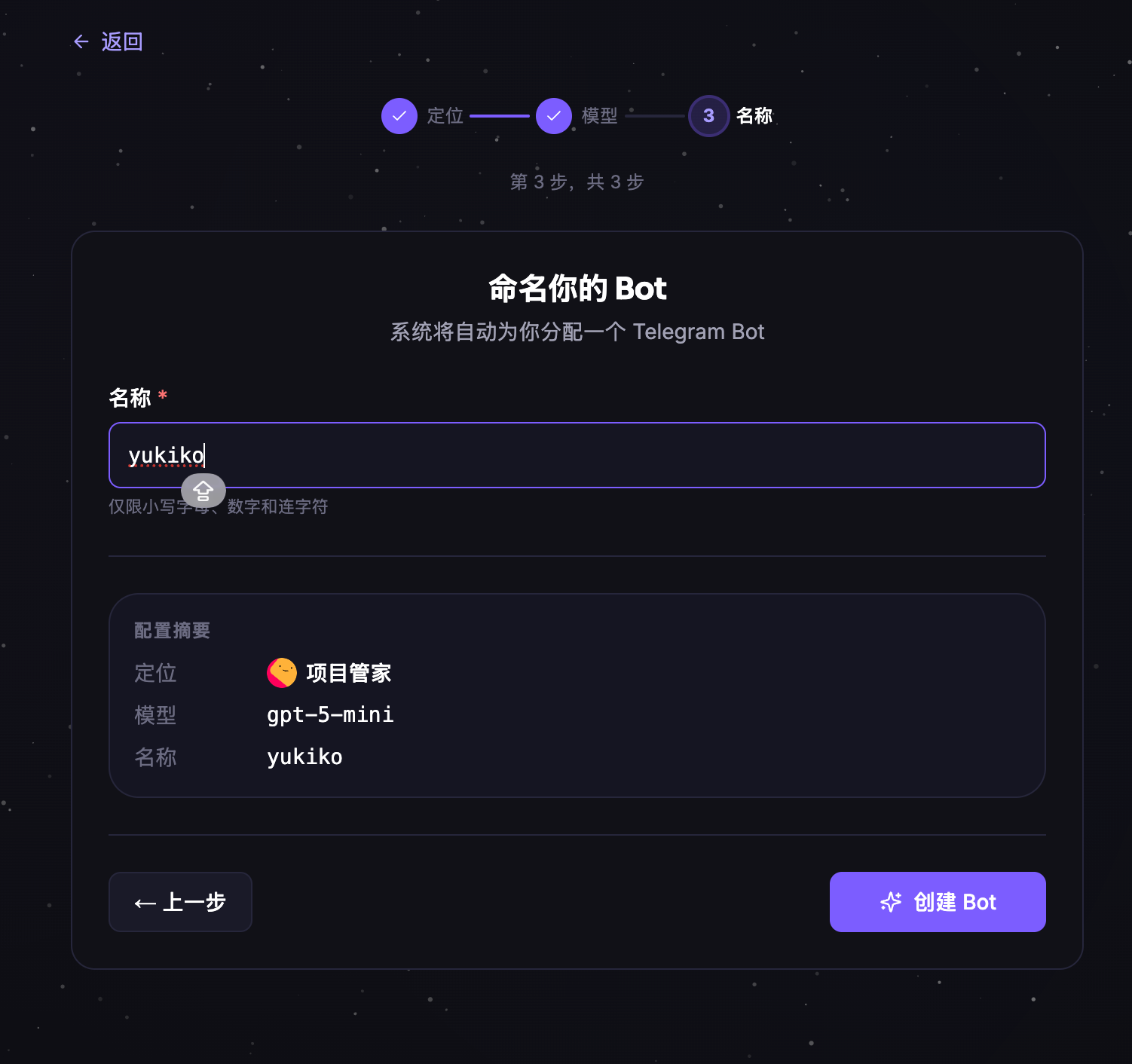
Click Create Bot. The platform automatically:
- Assigns and hosts a Telegram Bot from the Bot Pool
- Returns a
@botUsernameyou can use in Telegram immediately - Boots the Agent gateway — ready in about 30 seconds
On success you'll see a confirmation page with your Bot's @username, the Telegram deep link, and the next 3 onboarding steps:
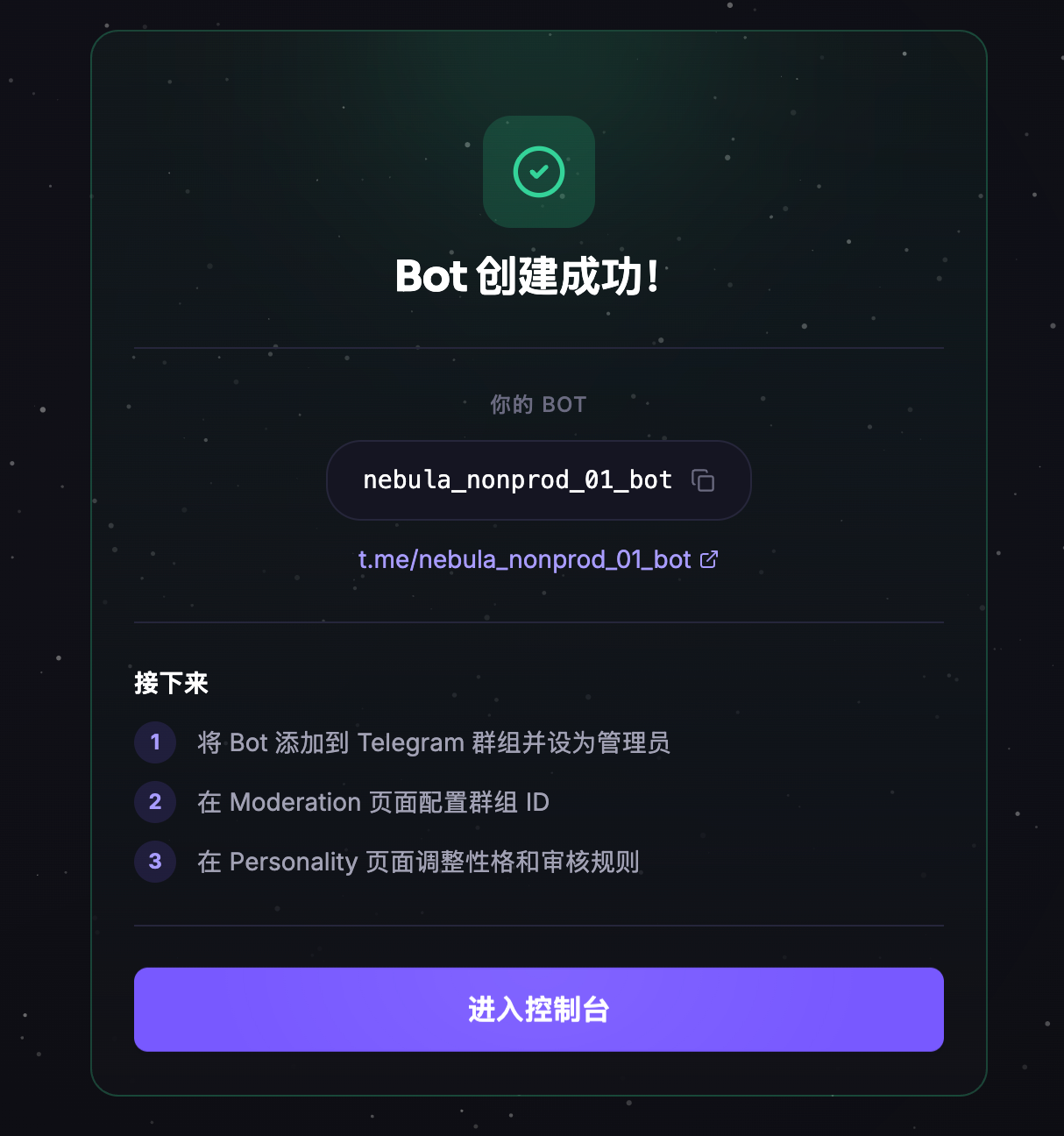
t.me/<botUsername> link to jump straight to the Bot chat.Add the Bot to your group
- In your Telegram group → Add members → search
@botUsernameand add it - Promote the Bot to group admin (required for moderation)
- In the console, go to Moderation → Telegram Groups and add the group ID
Get the group ID with @userinfobot (3 steps)
No need to add @userinfobot to the group — you query it from the private chat.
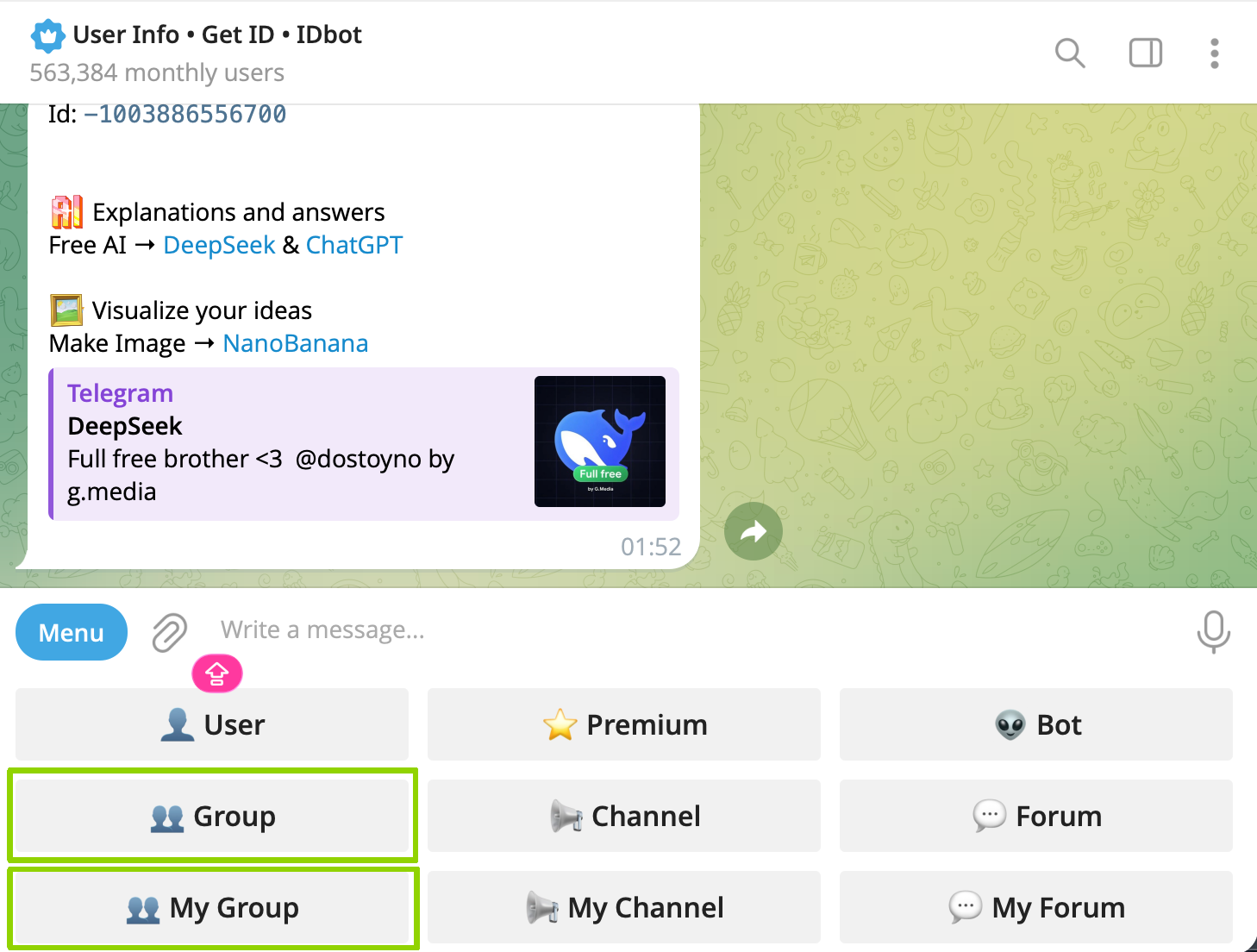
Open @userinfobot and tap Menu → Group / My Group
Search @userinfobot on Telegram → tap Start → tap Menu to open the 9-tile menu:
- Group = all groups where you're an admin
- My Group = groups you created
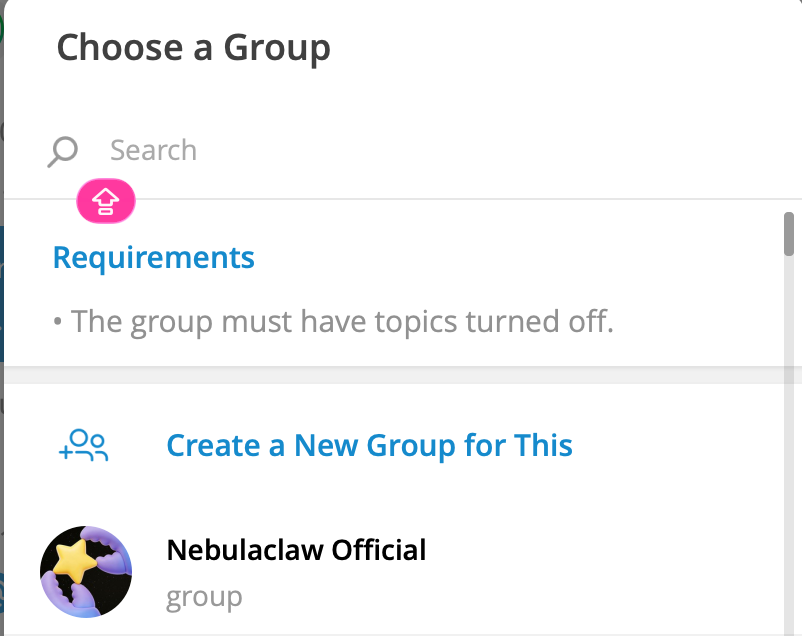
Select the target group from the list
A Choose a Group view appears. Tap the group you want to connect (note: the group must have Topics disabled — a requirement of @userinfobot).
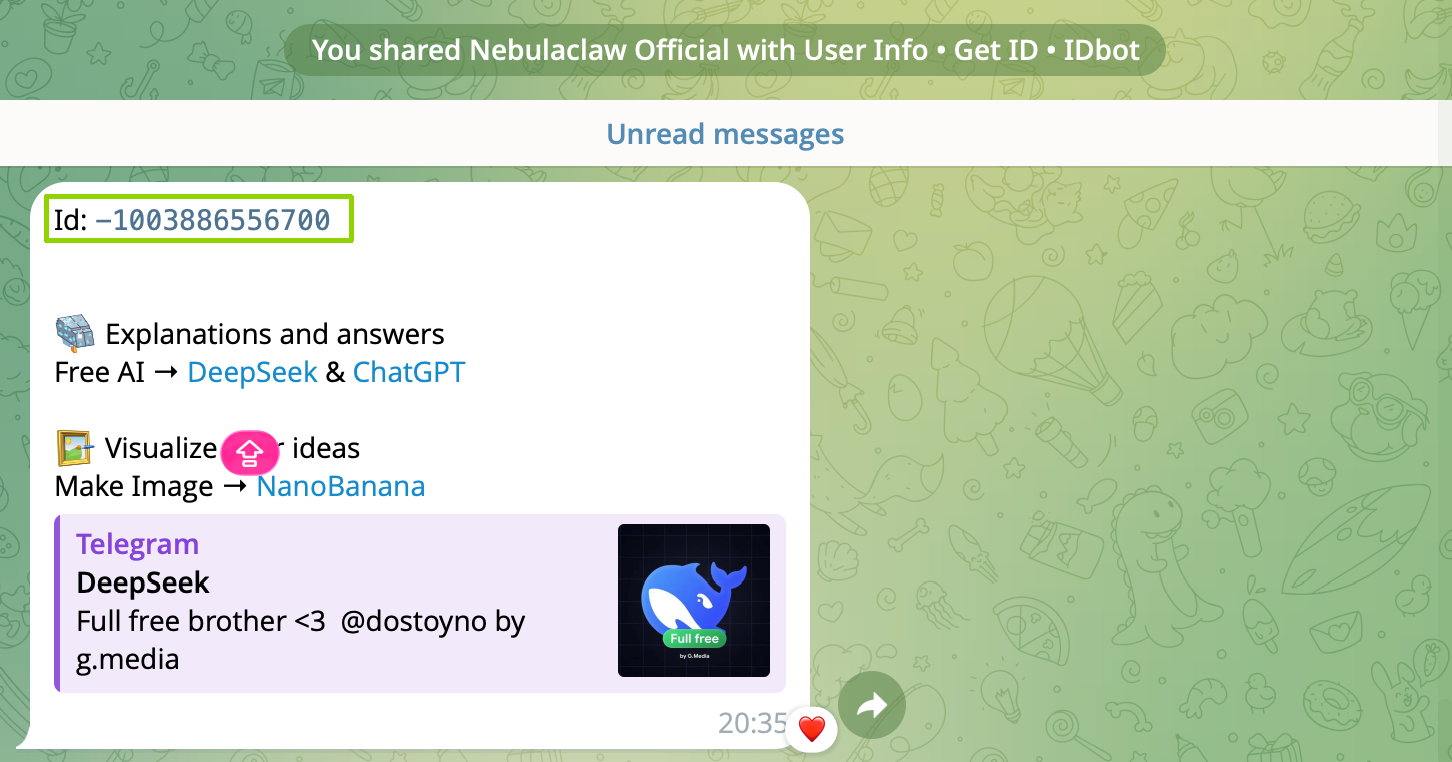
Copy the Chat ID into the console
The bot replies with Id: -100xxxxxxxxx. Copy this ID into Moderation → Telegram Groups in the console.
Upload knowledge
Go to Knowledge and upload anything you want the Agent to answer from:
- Product / project FAQ
- Whitepaper / doc summaries
- Community rules
- Troubleshooting notes
Content is semantically indexed — users can ask "how do I withdraw?" or "what's the fee?" and the Agent will answer even without keyword hits.
Set up moderation rules
Go to Moderation → Rules and click Add Rule. Each rule has:
- Description (natural language) — one sentence describing the trigger
- Action:
mute(duration or permanent) /kick(can rejoin) /ban(permanent)
Recommended baseline ruleset (copy-paste ready):
| Trigger | Action |
|---|---|
| Insults, personal attacks, continued provocation, or defamation — including against the project, team, or community members | kick |
| Scams or phishing messages | kick |
| Requesting or disclosing private keys / seed phrases | ban |
| Spam / advertising | mute 24h |
| Malicious links | mute 1h |
| Fake airdrops, referral-farming schemes | mute 24h |
The AI judges by context — no keyword lists needed. Every action is logged in Audit for review.
Check your analytics
Analytics → Dashboard:
- Daily / weekly message volume
- Active users
- Sentiment trend
- Moderation action counts
Billing → Usage shows current-month token consumption and remaining credits.